

A Facebook account is locked when Meta systems detect activity that violates platform security rules, community standards, or identity verification requirements, or when automated systems flag the account as potentially compromised.
In most cases, a lock is triggered by unusual login behavior, repeated policy violations, suspected automation, or unresolved identity checks. Some locks are temporary and resolve automatically. Others require manual verification or an appeal.
What “Account Locked” Actually Means Inside Facebook Systems
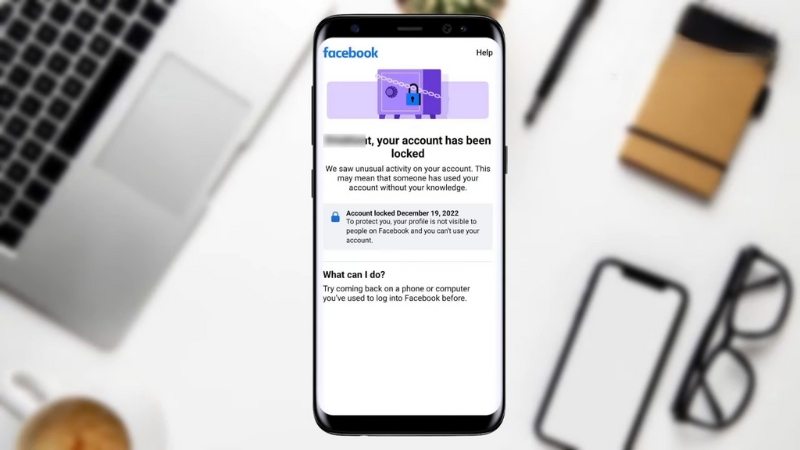
When Facebook locks an account, it does not immediately mean a permanent ban. A lock is a security or compliance state applied by automated enforcement systems operated by Meta, the company that owns Facebook.
These systems evaluate billions of actions daily across more than 3 billion monthly active users.
Locking is used as a containment mechanism when confidence in account safety or policy compliance drops below a defined threshold.
There are several internal lock categories. A security lock limits access until identity or ownership is confirmed.
A checkpoint lock pauses the account pending specific actions, such as photo recognition or ID upload. A policy enforcement lock follows repeated or severe violations of Community Standards.
A compromised account lock is applied when login patterns resemble known attack signatures. These categories matter because each unlock path is different, and using the wrong recovery flow often leads to repeated failures or permanent restriction.
The Most Common Causes of Facebook Account Lockouts

Facebook does not publish its exact detection thresholds, but years of transparency reports, enforcement documentation, and large-scale user data allow patterns to be identified. The causes below account for the majority of lock events globally.
Suspicious Login Activity and Device Mismatch
The single most common trigger is unusual login behavior. Facebook tracks IP address history, device fingerprints, browser characteristics, and login timing.
A sudden login from a new country, VPN exit node, or unfamiliar device can trigger an automated lock, especially if combined with failed password attempts.
Accounts accessed from multiple locations within short time windows are particularly vulnerable. For example, logging in from Serbia and then from Germany within minutes strongly resembles credential abuse.
This does not require malicious intent. Travel, shared devices, mobile data, IP rotation, and VPN usage are frequent innocent causes.
Automation, Bots, and Third-Party Tools
Using browser extensions, automation scripts, mass posting tools, or unofficial analytics software significantly increases lock risk. Facebook explicitly prohibits automated interaction that mimics human behavior, including auto-liking, auto-commenting, mass friend requests, and scraping.
Many users do not realize that seemingly harmless tools, such as engagement trackers or bulk messaging add-ons, create API patterns identical to bot networks. Once flagged, accounts often enter a recurring lock cycle even after tools are removed.
Repeated Community Standards Violations

Accounts that accumulate strikes for hate speech, harassment, misinformation, impersonation, or copyright infringement face escalating enforcement. Early violations may result in content removal.
Continued violations often result in temporary feature blocks. Eventually, the system escalates to account-level locks.
Importantly, Facebook enforcement is cumulative. Violations from months earlier still count toward enforcement thresholds. Deleting past posts does not reset the internal violation record.
Identity Verification Failures
Facebook requires real-identity compliance for personal profiles. Accounts that cannot pass identity verification during checkpoints are locked indefinitely.
This often affects users who registered with nicknames, pseudonyms, incomplete names, or inconsistent birthdates.
Uploading low-quality ID images, mismatched names, or expired documents frequently results in rejection. Multiple failed submissions reduce the likelihood of manual review.
Account Compromise and Reported Takeovers
If Facebook detects behavior consistent with known compromise patterns, such as password changes followed by spam messages, it locks the account to prevent further abuse. This also happens when other users report suspicious messages or phishing links sent from the account.
In these cases, even correct credentials will not restore access until security checks are completed.
Types of Facebook Locks and What Each One Requires
Not all locks are equal. Understanding the lock type saves time and reduces the risk of escalation.
Lock Type
Typical Trigger
What Access Looks Like
Required Action
Security Lock
New device, VPN, location change
Login blocked, security prompt shown
Confirm login, verify device or location
Checkpoint Lock
Identity uncertainty
Forced verification screens
Photo ID, face recognition, or trusted contacts
Policy Lock
Repeated violations
Account disabled or limited
Appeal decision, wait enforcement period
Compromised Lock
Suspected hacking
Password reset required
Secure account, review activity
Security and compromised locks are usually recoverable within hours or days. Policy locks and failed identity checkpoints can last weeks or become permanent.
Step-by-Step: How to Unlock a Facebook Account the Right Way
The unlock process is highly procedural. Deviating from Facebook’s prescribed flow often resets the timer or escalates enforcement.
Start by accessing Facebook from a stable, trusted device and network. Avoid VPNs and public Wi-Fi. Use the same browser and device previously associated with the account if possible.
Facebook assigns higher trust scores to known environments.
If prompted to verify identity, follow the instructions exactly. When uploading ID, ensure the image is clear, uncropped, and fully legible. Names must match the profile exactly.
If the profile name is incorrect, the system may permanently deny access.
When presented with a security review, carefully review recent activity. Mark only the actions you truly did not perform. Incorrect selections can be interpreted as deception.
Appeals for policy-based locks should be factual and minimal. Lengthy explanations, emotional language, or repeated submissions do not improve outcomes and may reduce review priority.
Why Some Accounts Never Get Unlocked
A significant number of locked accounts never regain access. This is not arbitrary. Several structural factors make recovery impossible in certain cases.
Accounts with falsified identities or repeated failed ID submissions are often auto-closed after review. Accounts tied to coordinated inauthentic behavior, spam networks, or repeated policy abuse are rarely reinstated.
Accounts that triggered enforcement under misinformation or election integrity rules face particularly strict scrutiny due to regulatory obligations.
Facebook does not provide human support for most individual cases. Reviews are prioritized based on risk, advertiser status, and public safety considerations. This explains why some users receive responses quickly while others wait indefinitely.
Preventing Future Facebook Account Lockouts
View this post on Instagram
Prevention is behavioral, not technical. Long-term account stability depends on consistent signals of legitimacy.
Use a single primary device and browser whenever possible. Avoid frequent VPN switching. Enable two-factor authentication with an authenticator app, not SMS. Review connected apps and remove anything unofficial or unused.
Maintain accurate profile information that matches government ID. Avoid rapid friend requests, mass messaging, or engagement spikes. Space out actions naturally.
Most importantly, treat Community Standards as cumulative enforcement, not one-off moderation. One removed post may seem minor. A pattern is not.
Lock Risk Factors at a Glance
Risk Factor
Impact on Lock Probability
Long-Term Effect
VPN usage
High
Repeated security locks
Automation tools
Very high
Escalating enforcement
Inconsistent identity data
High
Permanent lock risk
Prior violations
Medium to high
Faster escalation
Unsecured account
High
Compromise locks
Final Notes on Facebook Lockouts
Facebook account locks are not random and are rarely personal. They are the outcome of large-scale automated enforcement designed to protect platform integrity across billions of users.
Temporary deactivation can sometimes be confused with a lock, but deletion is a permanent, user-initiated action that follows an entirely different recovery path.
Most recoverable locks resolve through strict adherence to verification procedures. Most permanent losses occur after repeated noncompliance, automation use, or identity mismatches.